Desk Calendar Sign
An e-paper sign that shows the time and your next meetings, and sips power.
Try it
Behavior simulation: shows what it should do. It does not run the code.
Try this: Drag the time of day past 11:00 and watch the next meeting change, then press the button to peek at tomorrow.
Controls
- Time of day
- Show tomorrow button
What it does
- E-paper screen
- Minutes to next meeting
- Calendar is up to date
What it does
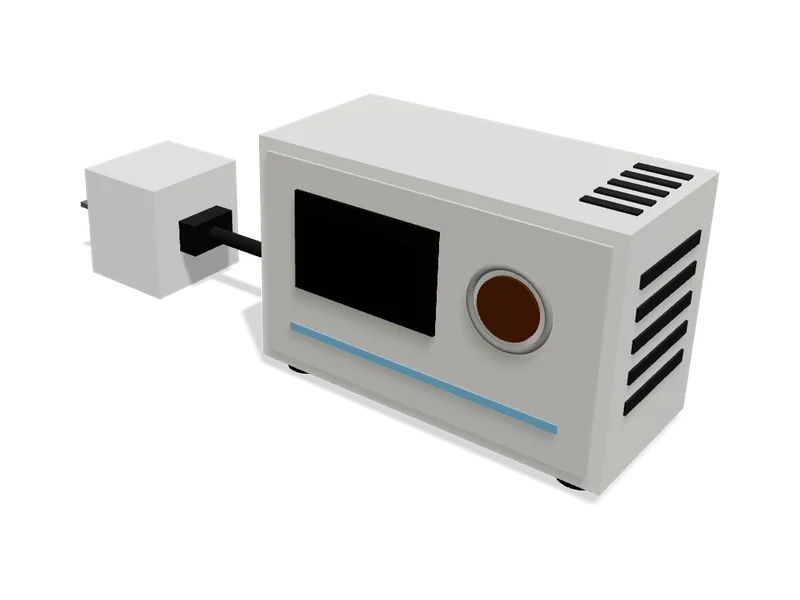
A small angled stand for your desk with a 2.9 inch e-paper screen. Every five minutes an ESP32 inside joins your Wi-Fi, reads your calendar's private link and shows today's date, the time and your next two meetings. E-paper looks like printed paper, is easy to read in daylight and keeps its picture with the power off, so the sign sleeps between updates. Press the button on top to see tomorrow for a few seconds.
Try it above: Drag the time of day past 11:00 and watch the next meeting change, then press the button to peek at tomorrow.
Safety
- Small parts: keep away from very young children.
What’s inside
8 parts. We buy, make and put these together for you.
Brain
Runs the program and makes the decisions.
- ESP32 DevKitC (ESP32-WROOM-32, 38-pin)1×
$16.99
Joins your Wi-Fi, reads your calendar and draws the screen, then sleeps.
- 28 × 54 × 10 mm
- Runs on: 4.75 to 5.25 V
- Draws: about 80 mA
Pack of 2, you use 1, the spare is yours.
list price, checked Oct 5, 2026 at AmazonView
Controls
What you press, turn or flip.
- Panel-mount push button, 16 mm1×
$0.95
Press it to see tomorrow's meetings for a few seconds.
- 18 × 18 × 29 mm
- Runs on: 0 to 12 V
- Weight: 4.6 g
list price, checked Oct 5, 2026 at AdafruitView
Lights, sound and screen
How it tells you what it is doing.
- 2.9" e-paper display, 296x128 (SPI)1×
$21.99
Shows the time and your meetings like printed paper; keeps the picture with the power off.
- 90 × 38 × 1 mm
- Runs on: 3.3 to 5 V
- Draws: about 8 mA
list price, checked Oct 5, 2026 at a generic supplierView
Motion
Everything that moves.
- Rubber feet, 8 mm (stick-on)4×
$0.60
Stop the sign sliding on the desk.
- 11 × 5.6 × 0.3 cm
estimate
Power
Where its energy comes from.
- 5 V USB power adapter with 1.5 m USB cable1×
$9.00
Powers the sign from any household power outlet through the board's USB port.
- Output: 5 V DC, 1 A
estimate
Body and structure
The case, frame and panels.
- 3D-printed angled stand (front frame and back cover)1×
$4.00
Holds the screen at an easy reading angle and hides the electronics.
- 12 × 6.9 × 8.5 cm
- Material: PLA
- Tilt deg: 15
Made by usestimate
Fixings
Screws, bolts and ties that hold it together.
- Brass heat-set insert, M3 x 4 mm4×
$5.95
Give the screws strong metal threads in the printed stand.
- 4 × 4 × 4 mm
Pack of 50, you use 4, the 46 spares are yours.
list price, checked Oct 5, 2026 at AdafruitView - M3 socket head screw (6-30 mm)4×
$9.99
Hold the back cover and the board in the stand.
- 6 × 6 × 13 mm
Pack of 1120, you use 4, the 1116 spares are yours.
list price, checked Oct 5, 2026 at AmazonView
Parts total (8 lines)
$69.47
$55.87 from supplier list prices, $13.60 estimated. Preparation and shipping are added when you order.
How it goes together
The step-by-step instructions that come with your order, 1 step. Try them here first.
Before you start
Desk Calendar Sign goes together in 1 step, about 2 min in all. No soldering and no coding.
Already done in our workshop
- Print the stand
- Wire the screen and button
- Load the program and your calendar
- Close it up
1 step
Code
The code it runs1 file, 152 lines. We load it onto the board for you.
Uses: GxEPD2, Adafruit GFX Library
// Desk Calendar Sign// -------------------// Shows the time and your next two meetings on a 2.9" e-paper screen.// Every 5 minutes it wakes up, joins Wi-Fi, downloads your calendar's private// iCal link, redraws the screen and goes back to deep sleep. E-paper keeps the// picture with the power off, so the sign uses almost no electricity.// Press the button to see tomorrow instead of today for a few seconds.//// Settings are written to the board by our workshop before it ships// (Wi-Fi name, password and your calendar link are stored in flash). #include <WiFi.h>#include <HTTPClient.h>#include <Preferences.h>#include <time.h>#include <GxEPD2_BW.h>#include <Fonts/FreeSansBold12pt7b.h>#include <Fonts/FreeSans9pt7b.h> // ---- Wiring (matches the project's wiring view) ----const int EPD_CS = 26; // screen chip selectconst int EPD_DC = 17; // screen data / commandconst int EPD_RST = 16; // screen resetconst int EPD_BUSY = 4; // screen busy signalconst int BUTTON = 27; // "show tomorrow" button, pressed = LOW// SPI data and clock use the ESP32's standard pins (GPIO23 and GPIO18). GxEPD2_BW<GxEPD2_290_T94_V2, GxEPD2_290_T94_V2::HEIGHT> display(GxEPD2_290_T94_V2(EPD_CS, EPD_DC, EPD_RST, EPD_BUSY)); const uint64_t REFRESH_US = 5ULL * 60ULL * 1000000ULL; // wake every 5 minutesconst int MAX_EVENTS = 12; struct Event { time_t start; String title;};Event events[MAX_EVENTS];int eventCount = 0; // Read one iCal date like 20261007T093000Z into a time.time_t parseIcalTime(const String& v) { struct tm t = {}; t.tm_year = v.substring(0, 4).toInt() - 1900; t.tm_mon = v.substring(4, 6).toInt() - 1; t.tm_mday = v.substring(6, 8).toInt(); t.tm_hour = v.substring(9, 11).toInt(); t.tm_min = v.substring(11, 13).toInt(); return mktime(&t);} // Download the calendar and keep the events that start today or tomorrow.bool fetchCalendar(const String& url) { HTTPClient http; if (!http.begin(url)) return false; if (http.GET() != 200) return false; WiFiClient* stream = http.getStreamPtr(); time_t now = time(nullptr); time_t start = 0; String title; eventCount = 0; while (stream->connected() && eventCount < MAX_EVENTS) { String line = stream->readStringUntil('\n'); line.trim(); if (line.startsWith("DTSTART")) start = parseIcalTime(line.substring(line.indexOf(':') + 1)); if (line.startsWith("SUMMARY:")) title = line.substring(8); if (line == "END:VEVENT" && start > now - 3600 && start < now + 2 * 86400) { events[eventCount++] = {start, title}; } } http.end(); return true;} // Draw the date, the time and the next two events of the chosen day.void draw(bool tomorrow, bool online) { time_t now = time(nullptr); struct tm today; localtime_r(&now, &today); char header[32]; strftime(header, sizeof header, tomorrow ? "Tomorrow" : "%a %d %b %H:%M", &today); display.setRotation(1); display.setFullWindow(); display.firstPage(); do { display.fillScreen(GxEPD_WHITE); display.setTextColor(GxEPD_BLACK); display.setFont(&FreeSansBold12pt7b); display.setCursor(8, 26); display.print(header); display.setFont(&FreeSans9pt7b); int y = 60, shown = 0; for (int i = 0; i < eventCount && shown < 2; i++) { struct tm e; localtime_r(&events[i].start, &e); bool sameDay = tomorrow ? e.tm_yday == today.tm_yday + 1 : e.tm_yday == today.tm_yday && events[i].start > now; if (!sameDay) continue; char when[8]; strftime(when, sizeof when, "%H:%M", &e); display.setCursor(8, y); display.print(String(when) + " " + events[i].title); y += 26; shown++; } if (shown == 0) { display.setCursor(8, y); display.print(tomorrow ? "Nothing booked" : "Nothing else today"); } display.setCursor(8, 122); display.print(online ? "Updated just now" : "Offline: showing the last calendar"); } while (display.nextPage());} void setup() { pinMode(BUTTON, INPUT_PULLUP); bool tomorrow = esp_sleep_get_wakeup_cause() == ESP_SLEEP_WAKEUP_EXT0; Preferences prefs; prefs.begin("sign", true); String ssid = prefs.getString("ssid"), pass = prefs.getString("pass"), url = prefs.getString("ical"); prefs.end(); // Join Wi-Fi (give up after 15 seconds and show the last calendar). WiFi.begin(ssid.c_str(), pass.c_str()); unsigned long started = millis(); while (WiFi.status() != WL_CONNECTED && millis() - started < 15000) delay(200); bool online = WiFi.status() == WL_CONNECTED; if (online) { configTzTime("UTC0", "pool.ntp.org"); delay(1500); online = fetchCalendar(url); } display.init(115200); draw(tomorrow, online); if (tomorrow) { delay(8000); // show tomorrow for 8 seconds, then go back to today draw(false, online); } display.hibernate(); // Sleep until the next refresh or a button press. WiFi.disconnect(true); esp_sleep_enable_ext0_wakeup((gpio_num_t)BUTTON, 0); esp_sleep_enable_timer_wakeup(REFRESH_US); esp_deep_sleep_start();} void loop() { // Never reached: the board sleeps between refreshes.} 
Comments
No comments yet
Sign in to comment. It is free.