Walk-Past Motion Alarm
Press once to arm it. If anyone walks past, it beeps loudly and flashes red.
Try it
Behavior simulation: shows what it should do. It does not run the code.
Try this: Press the button, wait for the 10 s countdown and sensor settling, then switch on 'Person walking past' to set it off. Press again to silence it.
Controls
- Arm / switch-off button
- Person's distance from sensor
What it does
- Red light
- Buzzer sound
- What it's doing
- Sensor status
- Sensor sees motion
- Sensor signal strength
- Alarm switched on
What it does
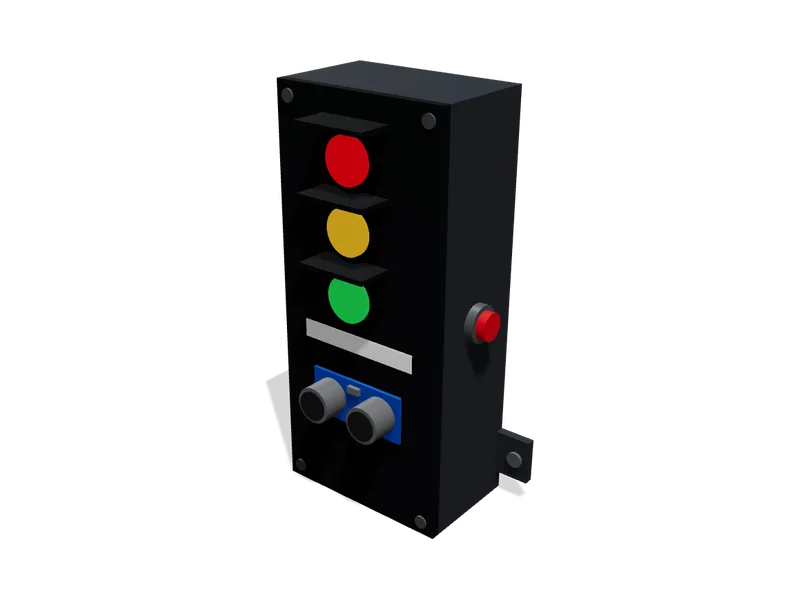
A small box with a motion sensor on the front, a red light, a loud buzzer and one big button. Press the button to arm it. You get a short countdown so you can walk away. While it is armed, anyone walking in front of the sensor sets off the buzzer and the flashing red light. Press the button again to silence it and switch it off. It runs from a USB phone charger, so there is no mains wiring inside the box.
Try it above: Press the button, wait for the 10 s countdown and sensor settling, then switch on 'Person walking past' to set it off. Press again to silence it.
Safety
- The buzzer is loud (about 85 dB). Don't hold it right next to your ear
- Use a proper 5 V USB phone charger. Cheap, damaged chargers can overheat
- The case has small parts. Keep it away from very young children
What’s inside
20 parts. We buy, make and put these together for you.
Brain
Runs the program and makes the decisions.
- Arduino Nano1×
$25.70
The small brain that runs the alarm program: it reads the button and sensor and controls the light and buzzer.
- 18 × 45 × 8 mm
- Power: 5 V from USB
- Firmware: arduino-cpp, pre-loaded
- Runs on: 5 to 12 V
- Draws: about 20 mA
list price, checked Oct 5, 2026 at a generic supplierView
Senses
Measures the world around it.
- HC-SR501 PIR motion sensor1×
$8.49
Notices a warm body (a person) moving in front of the box, up to about 7 m away.
- 32 × 24 × 25 mm
- Mode: repeat trigger (H jumper)
- Hold time: set to minimum (about 3 s)
- Sensitivity: set to about 6 m
- Lens diameter: 23 mm
Pack of 3, you use 1, the 2 spares are yours.
list price, checked Oct 5, 2026 at AmazonView
Controls
What you press, turn or flip.
- Panel-mount push button, 16 mm1×
$0.95
The one big button you press to arm the alarm or switch it off.
- 18 × 18 × 29 mm
- Type: momentary
- Pullup: board internal pull-up
- Runs on: 0 to 12 V
- Weight: 4.6 g
list price, checked Oct 5, 2026 at AdafruitView
Lights, sound and screen
How it tells you what it is doing.
- Active buzzer, 5 V1×
$0.95
Makes the loud alarm sound, the countdown chirps and the two 'switched off' beeps.
- 12 × 12 × 10 mm
- Loudness: about 85 dB at 10 cm
- Runs on: 3 to 5.5 V
- Draws: about 25 mA
list price, checked Oct 5, 2026 at AdafruitView - 5 mm LED, diffused red1×
$0.50
The red light that blinks during countdown, ticks while armed and flashes fast when the alarm goes off.
- 6 × 6 × 9 mm
- Runs on: 1.85 to 2.5 V
- Draws: about 15 mA
list price, checked Oct 5, 2026 at SparkFunView
Motion
Everything that moves.
- 5 mm LED panel holder (chrome bezel)1×
$0.30
Holds the red light neatly in its hole on the front of the box.
- 9 × 3 × 9 mm
- Size: 5 mm
estimate - Self-adhesive rubber feet, 10 mm4×
$0.40
Stop the box sliding around on a shelf or table.
- 94 × 40 × 3 mm
- Diameter: 10 mm
estimate
Power
Where its energy comes from.
- USB phone charger, 5 V 1 A (UL listed)1×
$6.00
Plugs into the wall and gives the alarm safe low-voltage power.
- 31 × 36 × 28 mm
- Output: 5 V, 1 A, USB-A
- Certification: UL listed
estimate
Small electronics and wiring
Resistors, connectors and cables that join it all up.
- PN2222 NPN transistor (2N2222 equivalent)1 packs
$1.95
Acts as a small switch so the buzzer gets its power without straining the board's pin.
- 5 × 4 × 5 mm
- Role: low-side switch for buzzer
- Runs on: 0 to 40 V
list price, checked Oct 5, 2026 at AdafruitView - Resistor 1 kΩ, 1/4 W, 5 %1×
$0.75
Limits the small current from the board into the buzzer transistor.
- 6 × 3 × 3 mm
- Used: 1
- Value: 1 kohm
- Runs on: 0 to 300 V
Pack of 25, you use 1, the 24 spares are yours.
list price, checked Oct 5, 2026 at AdafruitView - Resistor 220 Ω, 1/4 W, 5 %1×
$0.75
Protects the red light from getting too much current and burning out.
- 6 × 3 × 3 mm
- Used: 1
- Value: 220 ohm
- Runs on: 0 to 300 V
Pack of 25, you use 1, the 24 spares are yours.
list price, checked Oct 5, 2026 at AdafruitView - Electrolytic capacitor 100 µF 25 V1×
$7.99
Smooths the power so the buzzer starting up doesn't upset the sensor or the board.
- 6 × 6 × 11 mm
- Value: 100 uF 25 V
- Runs on: 0 to 25 V
Pack of 50, you use 1, the 49 spares are yours.
list price, checked Oct 6, 2026 at AmazonView - Ceramic capacitor 0.1 µF (104), 50 V1×
$1.95
Small filter right at the motion sensor's power pins to stop false alarms from electrical noise.
- 4 × 3 × 4 mm
- Used: 1
- Value: 100 nF
- Runs on: 0 to 50 V
- Weight: 0.15 g
Pack of 10, you use 1, the 9 spares are yours.
list price, checked Oct 5, 2026 at AdafruitView - Perma-Proto half-size solderable breadboard PCB1×
$4.50
The solid circuit board everything is fixed onto in our workshop so nothing comes loose.
- 81 × 51 × 2 mm
- Trim: cut to fit enclosure
- Weight: 12 g
list price, checked Oct 5, 2026 at AdafruitView - Hook-up wire 22 AWG solid core, 6 x 25 ft1 sets
$15.95
Short wires linking the button, light and sensor to the circuit board.
- 25 × 5.1 × 5.1 cm
- Used length: 600 mm
- Weight: 340.7 g
list price, checked Oct 5, 2026 at AdafruitView - Heat-shrink tubing assortment1 packs
$4.95
Covers the wire joints so no bare metal can touch.
- 15 × 0.5 × 0.5 cm
list price, checked Oct 5, 2026 at AdafruitView - USB-A to Mini-USB cable, 1.5 m1×
$3.00
Carries power from the charger into the box.
- 44 × 12 × 8 mm
- Length: 1500 mm
estimate
Body and structure
The case, frame and panels.
- 3D-printed enclosure (base + lid)1 sets
$5.00
The box that holds everything, with holes for the sensor dome, red light, button and USB cable.
- 10 × 4.6 × 6.7 cm
- Size: 100 x 70 x 45
- Material: PLA, 2 mm walls
- Side hole: USB slot
- Front holes: PIR dome 23 mm, LED 8 mm, button 16 mm
Made by usestimate
Fixings
Screws, bolts and ties that hold it together.
- Brass heat-set insert, M3 x 4 mm8×
$5.95
Metal threads melted into the plastic so the lid and boards screw on firmly.
- 4 × 4 × 4 mm
Pack of 50, you use 8, the 42 spares are yours.
list price, checked Oct 5, 2026 at AdafruitView - M3 socket head screw (6-30 mm)8×
$9.99
Hold the lid, circuit board and motion sensor in place.
- 6 × 6 × 13 mm
- Length: 8 mm
Pack of 1120, you use 8, the 1112 spares are yours.
list price, checked Oct 5, 2026 at AmazonView
Parts total (20 lines)
$106.02
$91.32 from supplier list prices, $14.70 estimated. Preparation and shipping are added when you order.
How it goes together
The step-by-step instructions that come with your order, 4 steps. Try them here first.
Before you start
Walk-Past Motion Alarm goes together in 4 steps, about 16 min in all. No soldering and no coding.
Already done in our workshop
- Print the case and fit the brass inserts
- Build the main circuit board
- Fit the sensor, button, light and buzzer into the case
- Wire everything to the board
- Load the program and test every function
- Close the case and pack it
4 steps
Code
The code it runs1 file, 213 lines. We load it onto the board for you.
/* Tinkerly - Motion Alarm Box --------------------------------------------------------------- What this program does (in plain words): - The box starts OFF. Nothing happens if someone walks past. - Press the big button: a 10-second countdown starts so you can walk away. The red light blinks slowly and the buzzer chirps once every second. - After the countdown the box is ARMED. The red light gives a short blink every 2 seconds to show it is watching. - If the motion sensor sees someone while armed, the ALARM goes off: the buzzer sounds and the red light flashes fast. - The alarm keeps going until 30 seconds after the LAST motion, then it goes quietly back to ARMED and keeps watching. - Press the button at any time (countdown, armed or alarm) to switch it OFF: buzzer stops, light goes dark, two short beeps. - For the first 30 seconds after plugging in, the sensor is ignored while it settles (these sensors give false alarms while warming up). - One press = one action. Holding the button down or a bouncy contact never toggles it twice. Wiring (Arduino Nano): D2 <- PIR motion sensor OUT (HIGH = motion) D3 <- Push button to GND (uses built-in pull-up, LOW = pressed) D4 -> 1k resistor -> transistor base -> active buzzer (HIGH = sound) D7 -> 220 ohm resistor -> red LED (HIGH = on) All timing uses millis(), so the box never "freezes" and always notices a button press straight away.*/ // ---------- Pin numbers (must match the wiring) ----------const uint8_t PIN_PIR = 2;const uint8_t PIN_BUTTON = 3;const uint8_t PIN_BUZZER = 4;const uint8_t PIN_LED = 7; // ---------- Timing settings (milliseconds) ----------const unsigned long SENSOR_SETTLE_MS = 30000UL; // ignore sensor after power-upconst unsigned long COUNTDOWN_MS = 10000UL; // arming countdownconst unsigned long ALARM_HOLD_MS = 30000UL; // keep sounding after last motionconst unsigned long CHIRP_MS = 100UL; // countdown chirp lengthconst unsigned long ARMED_BLINK_MS = 150UL; // armed "I'm watching" blinkconst unsigned long ARMED_PERIOD_MS = 2000UL; // armed blink every 2 sconst unsigned long ALARM_FLASH_MS = 62UL; // fast flash (about 8 per second)const unsigned long DEBOUNCE_MS = 30UL; // button must be steady this longconst unsigned long BEEP_LEN_MS = 120UL; // switch-off beep lengthconst unsigned long BEEP2_START_MS = 250UL; // second beep starts here // ---------- The four modes the box can be in ----------enum Mode { MODE_OFF, MODE_COUNTDOWN, MODE_ARMED, MODE_ALARM };Mode mode = MODE_OFF; unsigned long modeStartMs = 0; // when the current mode beganunsigned long lastMotionMs = 0; // last time motion was seen in alarmunsigned long offBeepStartMs = 0; // when the two switch-off beeps startedbool offBeepActive = false; // are the switch-off beeps playing? // ---------- Button debounce state ----------bool buttonStable = HIGH; // HIGH = not pressed (pull-up)bool buttonLastRead = HIGH;unsigned long buttonChangedMs = 0; // ---------- Status printing (helpful for workshop testing) ----------unsigned long lastPrintMs = 0; // Switch to a new mode and remember when it happenedvoid setMode(Mode newMode, unsigned long now) { mode = newMode; modeStartMs = now; switch (mode) { case MODE_OFF: Serial.println(F("OFF - press the button to arm")); break; case MODE_COUNTDOWN: Serial.println(F("ARMING - walk away")); break; case MODE_ARMED: Serial.println(F("ARMED - watching")); break; case MODE_ALARM: Serial.println(F("ALARM! Motion detected")); break; }} // Returns true exactly once for each clean press of the buttonbool buttonPressed(unsigned long now) { bool reading = digitalRead(PIN_BUTTON); if (reading != buttonLastRead) { buttonLastRead = reading; buttonChangedMs = now; // contact is moving, restart the timer } if ((now - buttonChangedMs) >= DEBOUNCE_MS && reading != buttonStable) { buttonStable = reading; if (buttonStable == LOW) { return true; // a new, steady press (not a hold) } } return false;} void setup() { pinMode(PIN_PIR, INPUT); pinMode(PIN_BUTTON, INPUT_PULLUP); pinMode(PIN_BUZZER, OUTPUT); pinMode(PIN_LED, OUTPUT); digitalWrite(PIN_BUZZER, LOW); digitalWrite(PIN_LED, LOW); Serial.begin(9600); Serial.println(F("Tinkerly motion alarm starting. Sensor settling for 30 s.")); // Read the button once so a button held during power-up is not a press buttonStable = digitalRead(PIN_BUTTON); buttonLastRead = buttonStable; buttonChangedMs = millis(); setMode(MODE_OFF, millis());} void loop() { unsigned long now = millis(); // ---------- 1. Button: arm, or switch off ---------- if (buttonPressed(now)) { if (mode == MODE_OFF) { setMode(MODE_COUNTDOWN, now); } else { setMode(MODE_OFF, now); offBeepActive = true; // play the two short beeps offBeepStartMs = now; } } // ---------- 2. Countdown finished -> armed ---------- if (mode == MODE_COUNTDOWN && (now - modeStartMs) >= COUNTDOWN_MS) { setMode(MODE_ARMED, now); } // ---------- 3. Motion sensor (only after it has settled) ---------- bool sensorReady = (now >= SENSOR_SETTLE_MS); bool motion = sensorReady && (digitalRead(PIN_PIR) == HIGH); if (motion && (mode == MODE_ARMED || mode == MODE_ALARM)) { if (mode == MODE_ARMED) { setMode(MODE_ALARM, now); } lastMotionMs = now; // every new motion restarts the 30 s } // ---------- 4. Alarm quiet for 30 s -> back to armed ---------- if (mode == MODE_ALARM && (now - lastMotionMs) >= ALARM_HOLD_MS) { setMode(MODE_ARMED, now); } // ---------- 5. Work out what the light and buzzer should do ---------- bool ledOn = false; bool buzzOn = false; unsigned long inMode = now - modeStartMs; switch (mode) { case MODE_COUNTDOWN: ledOn = ((inMode / 500UL) % 2UL) == 0; // slow blink: 0.5 s on, 0.5 s off buzzOn = (inMode % 1000UL) < CHIRP_MS; // short chirp each second break; case MODE_ARMED: ledOn = (inMode % ARMED_PERIOD_MS) < ARMED_BLINK_MS; // short blink every 2 s break; case MODE_ALARM: ledOn = ((now / ALARM_FLASH_MS) % 2UL) == 0; // fast flash buzzOn = true; // loud and steady break; case MODE_OFF: default: ledOn = false; if (offBeepActive) { unsigned long b = now - offBeepStartMs; if (b < BEEP_LEN_MS) { buzzOn = true; // first beep } else if (b >= BEEP2_START_MS && b < BEEP2_START_MS + BEEP_LEN_MS) { buzzOn = true; // second beep } else if (b >= BEEP2_START_MS + BEEP_LEN_MS) { offBeepActive = false; // beeps done } } break; } // Beeps only belong to the OFF mode; cancel them if we leave it if (mode != MODE_OFF) { offBeepActive = false; } digitalWrite(PIN_LED, ledOn ? HIGH : LOW); digitalWrite(PIN_BUZZER, buzzOn ? HIGH : LOW); // ---------- 6. Status once a second over USB (for testing) ---------- if (now - lastPrintMs >= 1000UL) { lastPrintMs = now; if (!sensorReady) { Serial.print(F("Sensor settling: ")); Serial.print((SENSOR_SETTLE_MS - now + 999UL) / 1000UL); Serial.println(F(" s")); } if (mode == MODE_COUNTDOWN && inMode < COUNTDOWN_MS) { Serial.print(F("ARMING in ")); Serial.print((COUNTDOWN_MS - inMode + 999UL) / 1000UL); Serial.println(F(" s - walk away")); } else if (mode == MODE_ALARM) { unsigned long since = now - lastMotionMs; Serial.print(F("ALARM! Quiet in ")); Serial.print(since < ALARM_HOLD_MS ? (ALARM_HOLD_MS - since + 999UL) / 1000UL : 0UL); Serial.println(F(" s if no more motion")); } }} 
Comments
No comments yet
Sign in to comment. It is free.