Quick-Draw Reaction Timer
Hit the big button the moment the light comes on and see how fast you really are.
Try it
Behavior simulation: shows what it should do. It does not run the code.
Try this: Tap the big button, wait for the red light, then tap again fast. Or switch on the pretend player and slide its reaction delay to watch scores change.
Controls
- Big arcade button (press / hold)
- Random wait length
- Pretend player reaction delay
What it does
- Screen
- Go light
- Button glow
- Button pressed in
- Buzzer
- Last reaction time
- Best score (saved)
- Wait length setting
- Pretend player reaction setting
- Pretend player playing
- Powered on
What it does
A tabletop game box with one big arcade button, a bright LED and a small screen. Press the button to start, wait for the light to come on after a random 1–5 second delay, then press again as fast as you can. The screen shows your reaction time in milliseconds and keeps your best score, even after it's switched off. If you press too early, it calls a false start.
Try it above: Tap the big button, wait for the red light, then tap again fast. Or switch on the pretend player and slide its reaction delay to watch scores change.
Safety
- The flashing LED could bother people sensitive to flashing lights (it only flashes for a moment and stays steady otherwise)
- Small parts inside the box; keep the case closed around young children
What’s inside
18 parts. We buy, make and put these together for you.
Brain
Runs the program and makes the decisions.
- Arduino Uno R31×
$27.60
The little computer that runs the game, measures your time and remembers your best score.
- 75 × 53 × 15 mm
- Runs on: 5 to 12 V
- Draws: about 50 mA
- Weight: 25 g
list price, checked Oct 5, 2026 at a generic supplierView
Controls
What you press, turn or flip.
- Arcade push button, 60 mm, with built-in LED1×
$4.50
The big button you slap to start a round and to stop the timer; its built-in light also glows as the 'go' signal.
- 60 × 60 × 10 mm
- Led: 12 V lamp swapped for 5 V LED
- Diameter: 60 mm
estimate - Rocker switch, panel mount, 2-pin1×
$0.80
Turns the game on and off.
- 5 × 21 × 15 mm
- Cutout: 19 x 13
estimate
Lights, sound and screen
How it tells you what it is doing.
- SSD1306 0.96" OLED, 128x64, I2C1×
$6.99
Shows messages like 'Press to start', your time and your best score.
- 28 × 27 × 11 mm
- Interface: I2C 0x3C
- Runs on: 3.3 to 5 V
- Draws: about 20 mA
list price, checked Oct 5, 2026 at AmazonView - 5 mm LED, diffused red1×
$0.50
The bright light that comes on after the random wait, telling you to press.
- 6 × 6 × 9 mm
- Mount: 5 mm panel bezel
- Runs on: 1.85 to 2.5 V
- Draws: about 15 mA
list price, checked Oct 5, 2026 at SparkFunView - Active buzzer, 5 V1×
$0.95
Beeps for a false start or a new best score.
- 12 × 12 × 10 mm
- Runs on: 3 to 5.5 V
- Draws: about 25 mA
list price, checked Oct 5, 2026 at AdafruitView
Motion
Everything that moves.
- 5 mm LED panel bezel (chrome)1×
$0.40
Holds the go light neatly in the lid.
- 10 × 10 × 3 mm
estimate - Rubber bumper feet (stick-on)4×
$0.60
Stop the box sliding on the table when you slam the button.
- 19 × 6.8 × 0.4 cm
estimate
Power
Where its energy comes from.
- 6 x AA battery holder with 2.1 mm plug1×
$2.50
Powers the game without a wall plug.
- 6.6 × 10 × 1.9 cm
- Voltage: 9 V
- Draws: about 500 mA
- Weight: 47 g
list price, checked Oct 5, 2026 at AdafruitView - AA alkaline batteries, 4 pack2 packs
$5.90
The batteries that go in the holder (6 needed).
- 15 × 15 × 51 mm
- Runs on: 1 to 1.6 V
- Weight: 23 g
list price, checked Oct 5, 2026 at AdafruitView
Small electronics and wiring
Resistors, connectors and cables that join it all up.
- Resistor 220 Ω, 1/4 W, 5 %1×
$0.75
Limits the current so the LEDs don't burn out.
- 6 × 3 × 3 mm
- Value: 220 ohm
- Runs on: 0 to 300 V
Pack of 25, you use 1, the 24 spares are yours.
list price, checked Oct 5, 2026 at AdafruitView - DC barrel jack to screw terminal adapter (female)1×
$3.75
The battery holder's 2.1 mm plug goes into it; its screw terminals feed the switch and the board.
- 14 × 30 × 13 mm
- Runs on: 0 to 24 V
- Draws: about 0 mA
list price, checked Oct 5, 2026 at SparkFunView - Perma-Proto half-size solderable breadboard PCB1×
$4.50
A sturdy circuit board that holds the resistors and connections tidily.
- 81 × 51 × 2 mm
- Weight: 12 g
list price, checked Oct 5, 2026 at AdafruitView - Hook-up wire 22 AWG solid core, 6 x 25 ft1 sets
$15.95
Wires that connect the button, light, screen and switch to the board.
- 25 × 5.1 × 5.1 cm
- Weight: 340.7 g
list price, checked Oct 5, 2026 at AdafruitView - Heat-shrink tubing assortment1 packs
$4.95
Covers wire joints so nothing shorts out.
- 15 × 0.5 × 0.5 cm
list price, checked Oct 5, 2026 at AdafruitView
Body and structure
The case, frame and panels.
- 3D-printed game box (base + lid)1×
$4.90
The sturdy box that holds everything, with holes for the button, light, screen and switch.
- 21 × 8.2 × 9.6 cm
- Size: 208 x 110 x 80
- Material: PLA, 2.4 mm walls
- Print weight: about 350 g of PLA
Made by usestimate
Fixings
Screws, bolts and ties that hold it together.
- Brass heat-set insert, M3 x 4 mm12×
$5.95
Strong threads in the plastic so screws hold the lid and boards firmly.
- 4 × 4 × 4 mm
Pack of 50, you use 12, the 38 spares are yours.
list price, checked Oct 5, 2026 at AdafruitView - M3 socket head screw (6-30 mm)12×
$9.99
Hold the lid, the Arduino and the screen in place.
- 6 × 6 × 13 mm
- Length: 8-12
Pack of 1120, you use 12, the 1108 spares are yours.
list price, checked Oct 5, 2026 at AmazonView
Parts total (18 lines)
$101.48
$90.28 from supplier list prices, $11.20 estimated. Preparation and shipping are added when you order.
How it goes together
The step-by-step instructions that come with your order, 2 steps. Try them here first.
Before you start
Quick-Draw Reaction Timer goes together in 2 steps, about 5 min in all. No soldering and no coding.
Already done in our workshop
- Print the game box and fit the threaded inserts
- Build the small wiring board
- Mount the front panel parts
- Wire everything to the Arduino
- Load the game program and test it
- Close the box and finish
Have these ready
- Small screwdriver
2 steps
Code
The code it runs1 file, 358 lines. We load it onto the board for you.
Uses: Adafruit SSD1306, Adafruit GFX Library, Wire (built-in), EEPROM (built-in)
/* ========================================================================== REACTION GAME BOX - firmware for the Arduino Uno inside the box ========================================================================== What this program does, in plain words: - When the box is idle, the screen says "Press to start" and shows the best time so far. The big button glows softly. - Press and let go of the big button to start a round. The screen says "Wait..." and the red GO light stays off for a random 1 to 5 seconds. - When the red GO light (and the big button) light up, the clock starts. Press as fast as you can. The screen shows your time in milliseconds (1000 ms = 1 second). - Press too early (before the light) and you get "Too soon!" with a low beep. That round does not count. - Nobody presses within 3 seconds of the light? "Too slow!" and back to the start screen. - Beat your best time and you get "New best!", a happy beep and a quick flash of the GO light. The best time is saved inside the Arduino's memory (EEPROM), so it is still there after switching off. - Hold the big button for 5 seconds on the start or result screen to wipe the best score. A countdown appears while you hold it. Pins used (must match the wiring list): D2 - big arcade button switch (other side to GND, uses internal pull-up) D3 - LED inside the arcade button (PWM, so it can glow dimly) D4 - red GO light (through a 220 ohm resistor) D7 - active buzzer (on = beep) A4 - screen SDA, A5 - screen SCL (I2C, screen address 0x3C) Libraries: Adafruit SSD1306, Adafruit GFX (plus built-in Wire, EEPROM). ==========================================================================*/ #include <Wire.h>#include <EEPROM.h>#include <Adafruit_GFX.h>#include <Adafruit_SSD1306.h> // ---------------- Pins ----------------const uint8_t PIN_BUTTON = 2; // arcade button switchconst uint8_t PIN_BUTTON_LED = 3; // light inside the arcade buttonconst uint8_t PIN_GO_LED = 4; // red GO lightconst uint8_t PIN_BUZZER = 7; // active buzzer // ---------------- Screen ----------------const uint8_t SCREEN_W = 128;const uint8_t SCREEN_H = 64;const uint8_t OLED_ADDR = 0x3C;Adafruit_SSD1306 display(SCREEN_W, SCREEN_H, &Wire, -1); // ---------------- Game timings (milliseconds) ----------------const unsigned long WAIT_MIN_MS = 1000; // shortest random waitconst unsigned long WAIT_MAX_MS = 5000; // longest random waitconst unsigned long GO_TIMEOUT_MS = 3000; // time allowed to reactconst unsigned long MESSAGE_MS = 2000; // how long "Too soon"/"Too slow" showsconst unsigned long CLEAR_HOLD_MS = 5000; // hold time to clear best scoreconst unsigned long DEBOUNCE_MS = 20; // ignore switch chatter shorter than thisconst unsigned long BEEP_EARLY_MS = 400;const unsigned long BEEP_NEWBEST_MS = 500;const unsigned long BEEP_CLEARED_MS = 300;const unsigned long FLASH_NEWBEST_MS = 600; // GO light flashes this long on a new bestconst uint8_t BUTTON_GLOW = 38; // soft glow level (about 15% of 255) // ---------------- Saved best score (EEPROM) ----------------const int EE_MAGIC_ADDR = 0; // marker byte: tells us the memory holds our dataconst int EE_BEST_ADDR = 1; // 2 bytes: best time in ms (0 = none yet)const uint8_t EE_MAGIC = 0xA5; // ---------------- Game phases ----------------enum Phase { IDLE, WAITING, GO, RESULT, EARLY, TIMEOUT, CLEARED };Phase phase = IDLE;unsigned long phaseStart = 0; // when the current phase beganunsigned long waitDur = 0; // random wait for this round uint16_t bestMs = 0; // best time (0 = no score yet)uint16_t lastMs = 0; // time of the last roundbool newBest = false; // did the last round set a new best? // Hold-to-clear trackingbool holding = false;unsigned long holdStart = 0; // Debounced button statebool btnRaw = false, btnStable = false;unsigned long btnLastChange = 0; // Screen refresh controlbool screenDirty = true;unsigned long lastScreenDraw = 0; // ---------------- Exact press timing during GO ----------------// While the GO light is on, an interrupt records the exact moment the button// goes down, so the time is accurate even while the screen is being drawn.volatile bool armGo = false;volatile bool goPressed = false;volatile unsigned long goPressMs = 0; void onButtonFall() { if (armGo && !goPressed) { goPressMs = millis(); goPressed = true; }} // ---------------- Helpers ----------------void setPhase(Phase p) { phase = p; phaseStart = millis(); screenDirty = true;} void saveBest() { EEPROM.update(EE_MAGIC_ADDR, EE_MAGIC); EEPROM.put(EE_BEST_ADDR, bestMs); // put() only writes bytes that changed} void loadBest() { if (EEPROM.read(EE_MAGIC_ADDR) == EE_MAGIC) { EEPROM.get(EE_BEST_ADDR, bestMs); if (bestMs > GO_TIMEOUT_MS) bestMs = 0; // guard against junk values } else { bestMs = 0; // brand new board: no score yet saveBest(); }} void startRound() { waitDur = random(WAIT_MIN_MS, WAIT_MAX_MS + 1); setPhase(WAITING);} // Prints the best score text, e.g. "182 ms" or "---"void printBest() { if (bestMs == 0) display.print(F("---")); else { display.print(bestMs); display.print(F(" ms")); }} // Shows the hold-to-clear countdown at the bottom of the screenvoid printHoldCountdown(unsigned long now) { if (holding && btnStable) { unsigned long held = now - holdStart; unsigned long left = (held >= CLEAR_HOLD_MS) ? 0 : CLEAR_HOLD_MS - held; display.setCursor(0, 56); display.print(F("Hold to clear: ")); display.print(left / 1000); display.print('.'); display.print((left % 1000) / 100); display.print(F(" s")); }} // ---------------- Draw the screen for the current phase ----------------void drawScreen(unsigned long now) { display.clearDisplay(); display.setTextColor(SSD1306_WHITE); display.setTextSize(1); display.setCursor(0, 0); switch (phase) { case IDLE: display.setTextSize(2); display.println(F("Press to")); display.println(F("start")); display.setTextSize(1); display.setCursor(0, 38); display.print(F("Best: ")); printBest(); printHoldCountdown(now); break; case WAITING: display.setTextSize(2); display.setCursor(16, 24); display.print(F("Wait...")); break; case GO: display.setTextSize(2); display.setCursor(4, 24); display.print(F("PRESS NOW!")); break; case RESULT: display.setTextSize(3); display.print(lastMs); display.setTextSize(2); display.print(F(" ms")); display.setTextSize(1); display.setCursor(0, 30); if (newBest) display.print(F("New best!")); else { display.print(F("Best: ")); printBest(); } display.setCursor(0, 44); display.print(F("Press to play again")); printHoldCountdown(now); break; case EARLY: display.setTextSize(2); display.println(F("Too soon!")); display.setTextSize(1); display.setCursor(0, 30); display.print(F("Round doesn't count")); break; case TIMEOUT: display.setTextSize(2); display.println(F("Too slow!")); display.setTextSize(1); display.setCursor(0, 30); display.print(F("No press within 3 s")); break; case CLEARED: display.setTextSize(1); display.println(F("Best score cleared")); display.setCursor(0, 20); display.setTextSize(2); display.println(F("Press to")); display.println(F("start")); printHoldCountdown(now); break; } display.display(); lastScreenDraw = now; screenDirty = false;} // ---------------- Setup: runs once at power-on ----------------void setup() { pinMode(PIN_BUTTON, INPUT_PULLUP); // pressed = LOW pinMode(PIN_BUTTON_LED, OUTPUT); pinMode(PIN_GO_LED, OUTPUT); pinMode(PIN_BUZZER, OUTPUT); digitalWrite(PIN_GO_LED, LOW); digitalWrite(PIN_BUZZER, LOW); Wire.begin(); Wire.setClock(400000); // fast I2C so the screen redraws quickly display.begin(SSD1306_SWITCHCAPVCC, OLED_ADDR); display.clearDisplay(); display.display(); // Mix some electrical noise into the random generator so waits differ each time randomSeed(analogRead(A0) ^ (analogRead(A1) << 4) ^ micros()); loadBest(); attachInterrupt(digitalPinToInterrupt(PIN_BUTTON), onButtonFall, FALLING); btnRaw = btnStable = (digitalRead(PIN_BUTTON) == LOW); setPhase(IDLE);} // ---------------- Main loop: runs over and over, never blocks ----------------void loop() { unsigned long now = millis(); // ---- 1. Read the button with debouncing, find press / release moments ---- bool pressed = false, released = false; bool raw = (digitalRead(PIN_BUTTON) == LOW); if (raw != btnRaw) { btnRaw = raw; btnLastChange = now; } if ((now - btnLastChange) >= DEBOUNCE_MS && btnStable != btnRaw) { btnStable = btnRaw; if (btnStable) pressed = true; else released = true; } // ---- 2. Start screens: press begins a hold, release starts a round ---- bool atStartScreen = (phase == IDLE || phase == RESULT || phase == CLEARED); if (atStartScreen && pressed) { holding = true; holdStart = now; screenDirty = true; } if (holding && btnStable && (now - holdStart) >= CLEAR_HOLD_MS) { // Held 5 seconds: wipe the best score holding = false; bestMs = 0; newBest = false; saveBest(); setPhase(CLEARED); } else if (holding && released) { // Short press: let go = start the round holding = false; startRound(); } // ---- 3. Game rules for each phase ---- switch (phase) { case WAITING: if (pressed) { setPhase(EARLY); // jumped the gun } else if (now - phaseStart >= waitDur) { // Light comes on: arm the exact-time catcher, then start the clock noInterrupts(); goPressed = false; armGo = true; interrupts(); digitalWrite(PIN_GO_LED, HIGH); analogWrite(PIN_BUTTON_LED, 255); setPhase(GO); } break; case GO: { noInterrupts(); bool gotPress = goPressed; unsigned long pressAt = goPressMs; interrupts(); if (gotPress && (pressAt - phaseStart) < GO_TIMEOUT_MS) { armGo = false; lastMs = (uint16_t)(pressAt - phaseStart); newBest = (bestMs == 0 || lastMs < bestMs); if (newBest) { bestMs = lastMs; saveBest(); } setPhase(RESULT); } else if (now - phaseStart >= GO_TIMEOUT_MS) { armGo = false; setPhase(TIMEOUT); } break; } case EARLY: case TIMEOUT: if (now - phaseStart >= MESSAGE_MS) setPhase(IDLE); break; default: break; } // ---- 4. Lights and buzzer, worked out fresh every loop ---- unsigned long dt = now - phaseStart; // Red GO light: on during GO, quick flashes after a new best bool goLight = false; if (phase == GO) goLight = true; else if (phase == RESULT && newBest && dt < FLASH_NEWBEST_MS) goLight = ((dt / 100) % 2 == 0); digitalWrite(PIN_GO_LED, goLight ? HIGH : LOW); // Button light: full during GO, soft glow on start screens, off otherwise uint8_t glow = 0; if (phase == GO) glow = 255; else if (phase == IDLE || phase == RESULT || phase == CLEARED) glow = BUTTON_GLOW; analogWrite(PIN_BUTTON_LED, glow); // Buzzer: low-ish short buzz for too soon, longer for new best, short for cleared bool beep = (phase == EARLY && dt < BEEP_EARLY_MS) || (phase == RESULT && newBest && dt < BEEP_NEWBEST_MS) || (phase == CLEARED && dt < BEEP_CLEARED_MS); digitalWrite(PIN_BUZZER, beep ? HIGH : LOW); // ---- 5. Screen: redraw on change, and every 100 ms during hold countdown ---- if (holding && btnStable && (now - lastScreenDraw) >= 100) screenDirty = true; if (screenDirty) drawScreen(now);} 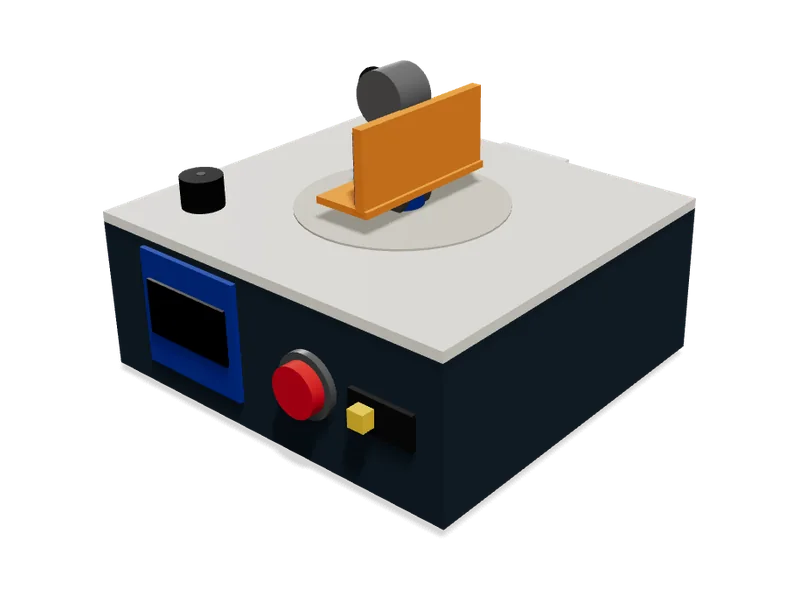
Comments
No comments yet
Sign in to comment. It is free.